KIC/JAVA
day27 - JAVA (자바, Collection, Iterator, Map)
바차
2021. 7. 21. 22:26
반응형
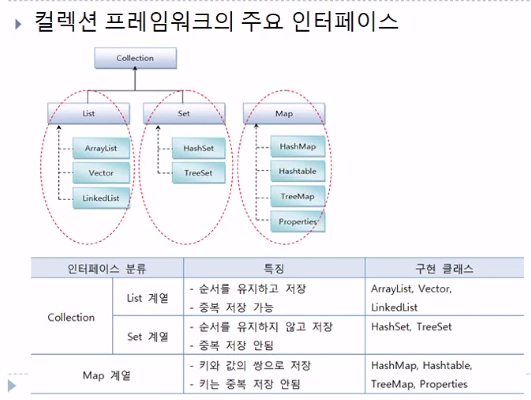
[Map의 메서드]
-> put() : key 와 value 값을 입력하는 것
-> containsKey() : 해당되는 키가 map에 포함되는지 확인하는 것
-> get() : key 값을 제공해 map이 가지고 있는 해당 value 값을 반환하는 것
-> keySet() : map의 key 값을 뽑아와서 Set 에 넣을 수 있다.
-> values() : map의 value 값을 뽑아서 Collection 에 넣을 수 있다.
-> entrySet() : map의 value 와 key 값을 한꺼번에 모아서 Set으로 보내는 것
[keySet()/values()/entrySet()]
package javaPro.java_collection;

import java.util.Collection;
import java.util.HashMap;
import java.util.Map;
import java.util.Set;

public class MapEx1 {
    public static void main(String[] args) {
        HashMap<String, Integer> map = new HashMap<String, Integer>();
        String[] names = { "홍길동", "김삿갓", "이몽룡", "임꺽정", "김삿갓" };
        int[] nums = { 1234, 4567, 2350, 9870, 3456 };

        for (int i = 0; i < names.length; i++) {
            map.put(names[i], nums[i]);
        }
        System.out.println(map);
        // Value =map.get(Key) => key에 해당하는 Value 값을 리턴
        System.out.println("홍길동의 번호 : " + map.get("홍길동"));
        System.out.println("이몽룡의 번호 :" + map.get("이몽룡"));
        System.out.println("김삿갓의 번호 :" + map.get("김삿갓"));
        // Key 값들만 조회

        System.out.println("Key들만 조회하기");

        Set<String> keys = map.keySet();    //key 값을 Set에 보내기
        for (String k : keys) {
            System.out.println(k + "의 번호" + map.get(k));
        }
        // Value값들만 조회하기
        System.out.println("Value 값들만 조회");
        Collection<Integer> values = map.values(); // => values 값을 Collection에 보내기

        for (Integer v : values) {
            System.out.println(v);
            // Key, Value 201
        }
        System.out.println("Key, Value의 쌍인 객체로 조회");

        Set<Map.Entry<String, Integer>> entry = map.entrySet();
        // key 와 values 값을 묶어서 Set에 보내기

        for (Map.Entry<String, Integer> m : entry) {
            System.out.println(m.getKey() + "의 번호 :" + m.getValue());
            System.out.println(m);
        }
    }
}
[login 예제]
package javaPro.java_collection;

import java.util.*;

public class MapLogin {
    public static void main(String[] args) {
        Hashtable<String, String> map = new Hashtable<String, String>();
        map.put("spring", "12");
        map.put("summer", "123");
        map.put("fall", "1234");
        map.put("winter", "12345");

        Scanner scanner = new Scanner(System.in);

        while (true) {
            System.out.println("아이디와 비밀번호를 입력해주세요.");
            System.out.print("아이디 : ");
            String id = scanner.nextLine();
            System.out.print("비밀번호 : ");
            String password = scanner.nextLine();
            System.out.println();
            // System.out.println(id);
            // System.out.println(password);

            if (map.containsKey(id)) { // id가 있는지 확인
                if (map.get(id).equals(password)) { // map에 저장되어 있는 password 확인
                    System.out.println("로그인 되었습니다.");
                    break;
                } else {
                    System.out.println("비밀번호 오류. 다시 입력하세요.");
                }

            } else {
                System.out.println("입력하신 아이디가 존재 x");
            }

        }
    }
}
[Iterator 예제]
package javaPro.java_collection;

import java.util.Map;
import java.util.Set;
import java.util.Collection;
import java.util.HashMap;
import java.util.Iterator;


/*
//Collection을 상속받은 객체들만 iterator를 쓸수 있다.
 * Collection : co.interator();
 * Set:  set.iterator()
 * List: li.interator()
 *
 *
//Collection을 상속받지 못한 Map는 iterator가 없다.
//HashMap을 Iterator로 수정하여 프린트한다
 * Map -> Set: keySet() -> iterator() (iterator를 쓰기 위해 Map을 Set으로 바꿔서 사용하기)
 * Map -> Set: entrySet() ->iterator() (iterator를 쓰기 위해 Map을 Set으로 바꿔서 사용하기)
 * Map -> Collection : values() -> iterator()  (iterator를 쓰기 위해 Map을 Collection으로 바꿔서 사용하기)
 * * */

public class IteratorEx2 {
    public static void main(String[] args) {

        // generic 표현 x
        Map map = new HashMap();

        // generic 표현
        // Map<String, Integer> map = new HashMap<String, Integer>();

        map.put("나자바", 85);
        map.put("홍길동", 90);
        map.put("동장군", 80);
        map.put("홍길동", 95); // key 중복시 값 수정
        System.out.println("총 entry 수 : " + map.size());

        // 객체 찾기
        System.out.println("/t홍길동 : " + map.get("홍길동"));
        System.out.println();

        // map.keySet()
        Set keySet = map.keySet(); // map을 keySet으로 Set에 넣는다.
        Iterator keyIterator = keySet.iterator(); // 그리고 Iterator를 사용한다.

        while (keyIterator.hasNext()) {
            String key = (String) keyIterator.next(); // Set<String>이기 때문에 (String) 붙혀서 형변환
            Integer value = (Integer) map.get(key); // 값은 (Integer)로 형변환
            System.out.println("\t" + key + ": " + value);
        }

    }
}
[Iterator 예제 변형]
-> generic 표현해서 형변환 x
-> keySet 활용하기
-> entrySet을 활용하기
-> values 활용하기
package javaPro.java_collection;

import java.util.Map;
import java.util.Set;
import java.util.Collection;
import java.util.HashMap;
import java.util.Iterator;

//

/*HashMap을 Iterator로 수정하여 프린트한다
//Collection을 상속받은 객체들만 iterator를 쓸수 있다.
 * Collection : co.interator();
 * Set:  set.iterator()
 * List: li.interator()
 *
 *
//Collection을 상속받지 못한 Map는 iterator가 없다.
 * Map -> Set: keySet() -> iterator() (iterator를 쓰기 위해 Map을 Set으로 바꿔서 사용하기)
 * Map -> Set: entrySet() ->iterator() (iterator를 쓰기 위해 Map을 Set으로 바꿔서 사용하기)
 * Map -> Collection : values() -> iterator()  (iterator를 쓰기 위해 Map을 Collection으로 바꿔서 사용하기)
 * * */

public class IteratorEx2_2 {
    public static void main(String[] args) {

        // generic 표현
        Map<String, Integer> map = new HashMap<String, Integer>();

        map.put("나자바", 85);
        map.put("홍길동", 90);
        map.put("동장군", 80);
        map.put("홍길동", 95); // key 중복시 값 수정
        System.out.println("총 entry 수 : " + map.size());

        // 객체 찾기
        System.out.println("\t홍길동 : " + map.get("홍길동"));
        System.out.println();

        // map.keySet()
        Set<String> keySet = map.keySet(); // map을 keySet으로 Set에 넣는다.
        Iterator<String> keyIterator = keySet.iterator(); // 그리고 Iterator를 사용한다.

        System.out.println("Set 으로 출력");
        while (keyIterator.hasNext()) {
            String key = keyIterator.next(); // generic이 이미 앞에서 명시해서 형변환 필요x
            Integer value = map.get(key); // generic이 이미 앞에서 명시해서 형변환 필요x
            System.out.println("\t" + key + ": " + value);
        }
        System.out.println();

        // iterator에 entrySet 넣어주기
        Set<Map.Entry<String, Integer>> entrySet = map.entrySet();
        Iterator<Map.Entry<String, Integer>> entryIt = entrySet.iterator();

        System.out.println("Entry로 출력");
        while (entryIt.hasNext()) {
            Map.Entry<String, Integer> en = entryIt.next();
            System.out.println("\t" + en.getKey() + " : " + en.getValue());
        }
        System.out.println();

        // Collection에 values 넣어주기 -> key 값은 출력하지 못한다.
        System.out.println("Collection으로 값만 출력");
        System.out.println("map.values()");
        Collection<Integer> c = map.values();
        Iterator<Integer> valueIterator = c.iterator();
        while (valueIterator.hasNext()) {
            Integer value = valueIterator.next();
            System.out.println("\t" + value);
        }
        System.out.println();

        // 객체 선택
        map.clear();
        System.out.println("총 Entry 수" + map.size());

    }
}
[Iterator 예제2]
package javaPro.java_collection;

import java.util.HashMap;
import java.util.Map;
import java.util.Iterator;
import java.util.Set;

class MapEx3 {
    // static HashMap phoneBook = new HashMap<>();
    static HashMap<String, Map<String, String>> phoneBook = new HashMap<>();

    public static void main(String[] args) {

        addPhoneNo("친구", "이자바", "010-111-1111");
        addPhoneNo("친구", "김자바", "010-222-2222");
        addPhoneNo("친구", "김자바", "010-333-3333");
        addPhoneNo("회사", "김대리", "010-444-4444");
        addPhoneNo("회사", "김대리", "010-555-5555");
        addPhoneNo("회사", "박대리", "010-666-6666");
        addPhoneNo("회사", "이과장", "010-777-7777");
        addPhoneNo("세탁", "010-888-8888");

        // System.out.println(phoneBook);

        printList();
    }

    static void addPhoneNo(String groupName, String name, String tel) {
        addGroup(groupName); // 그룹네임이 기존에 없는 이름이라면 생성

        // phoneBook 에서 기존 그룹네임중 groupName에 해당되는 그룹 가져오기
        HashMap<String, String> group = (HashMap) phoneBook.get(groupName);
        // HashMap group = (HashMap) phoneBook.get(groupName);

        // 지정한 해당 그룹에 전화번호와 이름 추가
        group.put(tel, name); // 이름은 중복될 수 있으니 전화번호를 key로 저장
    }

    static void addPhoneNo(String name, String tel) {
        addPhoneNo("기타", name, tel);
    }

    // 그룹네임이 없을 때 추가하는 메서드<String, HashMap>
    static void addGroup(String groupName) {
        if (!phoneBook.containsKey(groupName)) {
            phoneBook.put(groupName, new HashMap());
        }
    }

    static void printList() {
        Set set = phoneBook.entrySet();
        Iterator<Map.Entry<String, Map<String, String>>> it = set.iterator();
        while (it.hasNext()) {
            Map.Entry<String, Map<String, String>> e = it.next();
            // System.out.println("* " + e.getKey());
            // System.out.println(e.getValue());

            // Map 안에 있는 Map도 분할해서 따로 찍어주고 싶기 때문에 sbuIt을 만드는 과정
            Map<String, String> subMap = e.getValue();
            // Map<String, String>가 자료형인 subMap부터 생성
            Set subSet = subMap.entrySet();
            Iterator<Map.Entry<String, String>> subIt = subSet.iterator();
            System.out.println("* " + e.getKey() + "[" + subMap.size() + "]");

            while (subIt.hasNext()) {
                Map.Entry<String, String> subE = subIt.next();
                System.out.println(subE.getKey() + " " + subE.getValue());
            }
        }
    }
}
300x250