day28 - JAVA (자바, Collection 예제, 람다식)
Comparable과 Comparator 인터페이스 모두 객체를 정렬하기 위해 객체를 비교할 수 있도록 만드는 역할을 한다.
[Interface Comparable]
-> 정렬 수행시 기본적으로 적용되는 정렬 기준이 되는 메서드를 정의하는 인터페이스
-> Java에서 제공되는 정렬이 가능한 클래스들은 모두 Comparable 인터페이스를 구현하고 있다.
-> 정렬할 객체에 Comparable 인터페이스를 implements 한 후에 compareTo() 메서드를 오버라이드하여 구현한다.
[compareTo()]
-> 현재 객체 < 파라미터로 넘어온 객체 : 음수를 리턴
-> 현재 객체 와 파라미터로 넘어온 객체가 같은 경우 : 0 리턴
-> 현재 객체 > 파라미터로 넘어온 객체 : 양수 리턴
-> Collections.sort()를 통해서 음수 또는 0이면 객체의 자리가 그대로 유지되고, 양수인 경우에는 두 객체의 자리를 바꾼다.
[Interface Comparator]
-> 정렬 가능한 클래스들(Comparable 인터페이스를 구현한 클래스)들의 기본 정렬 기준과 다르게 정렬하고 싶을 때 사용하는 인터페이스
-> 기본적인 정렬 방법인 오름 차순 정렬을 내림차순으로 정렬할 때 많이 사용
-> Comparator interface를 implements 후 compare() 메서드를 오버라이드하여 사용
[compare() 메서드]
- 첫 번째 파라미터로 넘어온 객체 < 두 번째 파라미터로 넘어온 객체: 음수 리턴
- 첫 번째 파라미터로 넘어온 객체 == 두 번째 파라미터로 넘어온 객체: 0 리턴
- 첫 번째 파라미터로 넘어온 객체 > 두 번째 파라미터로 넘어온 객체: 양수 리턴
-> 음수 또는 0일때에는 객체의 자리 유지, 양수인 경우 두 객체의 자리 변경
[컬렉션 예제]
[예제1]
package javaPro.java_collection;

import java.io.File;
import java.io.FileNotFoundException;
import java.util.ArrayList;
import java.util.Collections;
import java.util.Comparator;
import java.util.List;
import java.util.Scanner;

class Student3 implements Comparable<Student3> {
    String stuno;
    String name;
    int kor;
    int math;
    int eng;
    int tot;

    public Student3(String stuno, String name, int kor, int math, int eng) {
        this.stuno = stuno;
        this.name = name;
        this.kor = kor;
        this.math = math;
        this.eng = eng;
        this.tot = kor + math + eng;
    }

    @Override
    public String toString() {
        return "[" + " stuno='" + stuno + "'" + ", name='" + name + "'" + ", kor='" + kor + "'" + ", math='" + math
                + "'" + ", eng='" + eng + "'" + ", tot='" + tot + "'" + "]";
    }

    @Override
    public int compareTo(Student3 o) {
        return stuno.compareTo(o.stuno);
    }
}

public class ScannerLoad {
    public static void main(String[] args) {
        try {
            Scanner sc = new Scanner(
                    new File("C:/Users/----/----/vscode/java/javaPro/java_collection/student.txt"));

            List<Student3> li = new ArrayList<Student3>();
            while (sc.hasNextLine()) {
                String line = sc.nextLine();
                String[] str = line.split(",");
                Student3 s = new Student3(str[0], str[1], Integer.parseInt(str[2]), Integer.parseInt(str[3]),
                        Integer.parseInt(str[4]));
                li.add(s);
                System.out.println(s);
            }

            System.out.println("1. 학번순 프린트 (Comparable)");


            Collections.sort(li);
            printList(li);

            System.out.println("2. 이름순 프린트 (Comparator)");
            Collections.sort(li, new Comparator<Student3>() {
                public int compare(Student3 o1, Student3 o2) {
                    return o1.name.compareTo(o2.name);
                }
            });
            printList(li);


            System.out.println("3. 총점순 프린트 (Comparator)");
            Collections.sort(li, new Comparator<Student3>() {
                public int compare(Student3 o1, Student3 o2) {
                    return o1.tot - o2.tot;
                }
            });
            printList(li);

        } catch (FileNotFoundException e) {
            e.printStackTrace();
        }
    }

    static void printList(List<Student3> li) {
        for (Student3 s : li) {
            System.out.println(s);
        }
    }
}
[예제 1 변형]
package javaPro.java_collection;

import java.io.File;
import java.io.FileNotFoundException;
import java.util.ArrayList;
import java.util.Collections;
import java.util.Comparator;
import java.util.HashMap;
import java.util.List;
import java.util.Scanner;

public class ScannerLoad2 {
    public static void main(String[] args) {
        try {
            Scanner sc = new Scanner(
                    new File("C:/Users/KYM/Documents/vscode/java/javaPro/java_collection/student.txt"));

            List<Student3> li = new ArrayList<Student3>();

            // 새로 Map 생성
            HashMap<String, Student3> map = new HashMap<String, Student3>();

            while (sc.hasNextLine()) {
                String line = sc.nextLine();
                String[] str = line.split(",");
                Student3 s = new Student3(str[0], str[1], Integer.parseInt(str[2]), Integer.parseInt(str[3]),
                        Integer.parseInt(str[4]));
                li.add(s);

                // stuno를 key로 하는 map을 생성한다.
                // 이후에 입력값으로 학번을 요구하기 때문이다.
                // 입력받은 학번 key 값에 따른 (인덱스 + 1)과 value 값을 출력할 예정
                map.put(s.stuno, s);

                System.out.println(s);
            }

            System.out.println("등수 list");
            Collections.sort(li, new Comparator<Student3>() {
                public int compare(Student3 o1, Student3 o2) {
                    return o1.tot - o2.tot;
                }
            });
            printList(li);

            Scanner scan = new Scanner(System.in);
            System.out.println("학번을 입력하세요");

            String input = scan.nextLine();

            Student3 s = map.get(input);
            System.out.println(s); // 이전 파일에서 toString을 재정의 해놓았음

            // 인덱스 + 1 , 순서는 총점순 프린트로 이미 정렬했다.
            System.out.println("등수는 : " + (li.indexOf(s) + 1));

        } catch (FileNotFoundException e) {
            e.printStackTrace();
        }
    }

    static void printList(List<Student3> li) {
        for (Student3 s : li) {
            System.out.println(s);
        }
    }
}
[람다식]
-> 람다 계산법에서 사용된 식을 프로그래밍 언어에 접목
-> 익명 함수를 생성하기 위한 식
-> 코드가 간결해지고 컬랙션 요소를 필터링(where 조건절) 또는 매핑(자료중에 특정 요소를 뽑는 것)이 쉽다는 장점
-> 람다 식을 쓰기 위해서는 우선 인터페이스가 있어야 한다.
-> 인터페이스가 가진 추상 메서드가 하나일 경우에만 람다 식이 허용이 된다.

-> 1. 함수적 인터페이스는 추상 메서드가 하나이다.
-> 2. 하나의 추상 메서드를 재정의 해서 사용하는 것이 람다식이다.
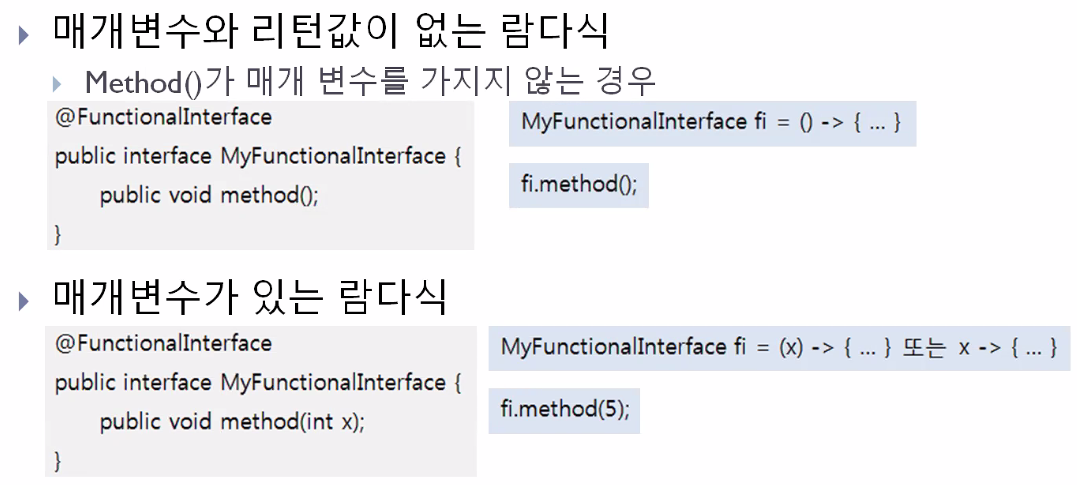
[함수적 스타일의 람다식 작성법]
-> 매개 타입은 런 타임시에 대입값에 따라 자동 인식한다 -> 생략 가능
-> 하나의 매개변수만 있을 경우에는 괄호() 생략 가능하다.
-> 하나의 실행문만 있다면 중괄호{} 생략 가능하다.
-> 매개변수 없다면 괄호() 생략 불가
-> 리턴 값이 있는 경우, return문 사용 가능
-> 중괄호 {}에 return문만 있을 경우, 중괄호 생략 가능
[타겟 타입]
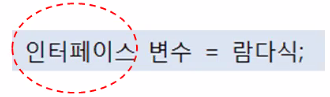
-> 람다식이 대입 되는 인터페이스
-> 익명 구현 객체를 만들 때 사용할 인터페이스
[함수적 인터페이스(functional interface)]
-> 하나의 추상 메소드만 선언된 인터페이스가 타겟 타입
-> @FuntionalInterface 어노테이션
- 하나의 추상 메소드만을 가지는지 컴파일러가 체크
- 두 개 이상의 추상 메소드가 선언되어 있으면 컴파일 오류 발생

[로컬 변수의 사용]
-> 람다식은 함수적 인터페이스의 익명 구현 객체 생성
-> 람다식에서 사용하는 외부 로컬 변수는 final 특성

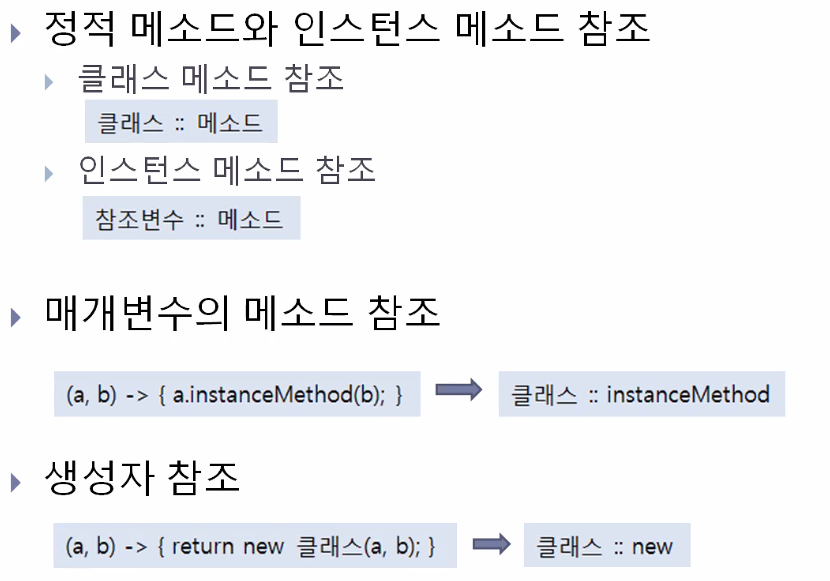
[메소드 참조]
[람다 예제]
package javaPro.java_lambda;

/*
 * 람다식 예제 : jdk8.0 이후 버전에서 사용가능.
 * 람다식에서 사용할 수 있는 인터페이스는 반드시 FunctionalInterface여야함
 * @FunctionInterface : 인터페이스에는 추상메서드가 한개임.
 * 매개변수가 없고, 리턴값도 없는 경우
 * 매개변수 없음 : ()->{.... }
 * 람다식 내부에 실행되는 구문이 한개인 경우 { } 생략 가능
 */

interface LambdaInterface1 {
    void method();
}

public class LambdaEx1 {
    public static void main(String[] args) {
        // 기존 방식으로 코딩
        LambdaInterface1 fi = new LambdaInterface1() {

            @Override
            public void method() {
                System.out.println("1)  기존 방식으로 코딩");
            }

        };
        fi.method();

        // 람다 식은 구현할 추상메서드가 1개여야 사용 가능하다.
        fi = () -> {
            String str = "2) method call1"; // 람다식에서 method를 재정의
            System.out.println(str);
        };
        fi.method();

        fi = () -> {
            System.out.println("3) method call2"); // 람다식에서 method를 재정의
        };
        fi.method();

        fi = () -> {
            System.out.println("4) method call3"); // 람다식에서 method를 재정의
        };
        fi.method();

        fi = () -> System.out.println("5) method call4"); // 람다식에서 method를 재정의
        fi.method();

        // excute1(LambdaInterface1 f1) 에서 f1 자리에
        // () -> System.out.println("=========LambdaInterface1 test")를 넣은 것
        excute(() -> {
            System.out.println("6) =========LambdaInterface1 parameter");
        });// 람다식에서 method를 재정의
        excute(() -> System.out.println("7) 한 줄인 경우 중괄호 생략 가능"));

    }

    static void excute(LambdaInterface1 f1) {
        f1.method();
    }
}
[이전 예제1 람다로 변형]
package javaPro.java_lambda;

import java.io.File;
import java.io.FileNotFoundException;
import java.util.ArrayList;
import java.util.Collections;
import java.util.List;
import java.util.Scanner;

class Student3 implements Comparable<Student3> {
    String stuno;
    String name;
    int kor;
    int math;
    int eng;
    int tot;

    public Student3(String stuno, String name, int kor, int math, int eng) {
        this.stuno = stuno;
        this.name = name;
        this.kor = kor;
        this.math = math;
        this.eng = eng;
        this.tot = kor + math + eng;
    }

    @Override
    public String toString() {
        return "[" + " stuno='" + stuno + "'" + ", name='" + name + "'" + ", kor='" + kor + "'" + ", math='" + math
                + "'" + ", eng='" + eng + "'" + ", tot='" + tot + "'" + "]";
    }

    @Override
    public int compareTo(Student3 o) {
        return stuno.compareTo(o.stuno);
    }
}

public class Lambda_ScannerLoad {
    public static void main(String[] args) {
        try {
            Scanner sc = new Scanner(
                    new File("C:/Users/KYM/Documents/vscode/java/javaPro/java_collection/student.txt"));

            List<Student3> li = new ArrayList<Student3>();
            while (sc.hasNextLine()) {
                String line = sc.nextLine();
                String[] str = line.split(",");
                Student3 s = new Student3(str[0], str[1], Integer.parseInt(str[2]), Integer.parseInt(str[3]),
                        Integer.parseInt(str[4]));
                li.add(s);
                System.out.println(s);
            }
            System.out.println("1. 학번순 프린트 (Comparable)");
            Collections.sort(li);
            printList(li);

            // lambda 로 이렇게 이전 코드를 쉽게 쓸 수 있다.
            System.out.println("2. 이름순 프린트 (Comparator)");
            Collections.sort(li, (o1, o2) -> o1.name.compareTo(o2.name));
            printList(li);

            // lambda 로 이렇게 이전 코드를 쉽게 쓸 수 있다.
            System.out.println("3. 총점순 프린트 (Comparator)");
            Collections.sort(li, (o1, o2) -> o1.tot - o2.tot);
            printList(li);

        } catch (FileNotFoundException e) {
            e.printStackTrace();
        }
    }

    static void printList(List<Student3> li) {
        for (Student3 s : li) {
            System.out.println(s);
        }
    }
}
Comparable/Comparator 참고:
https://gmlwjd9405.github.io/2018/09/06/java-comparable-and-comparator.html